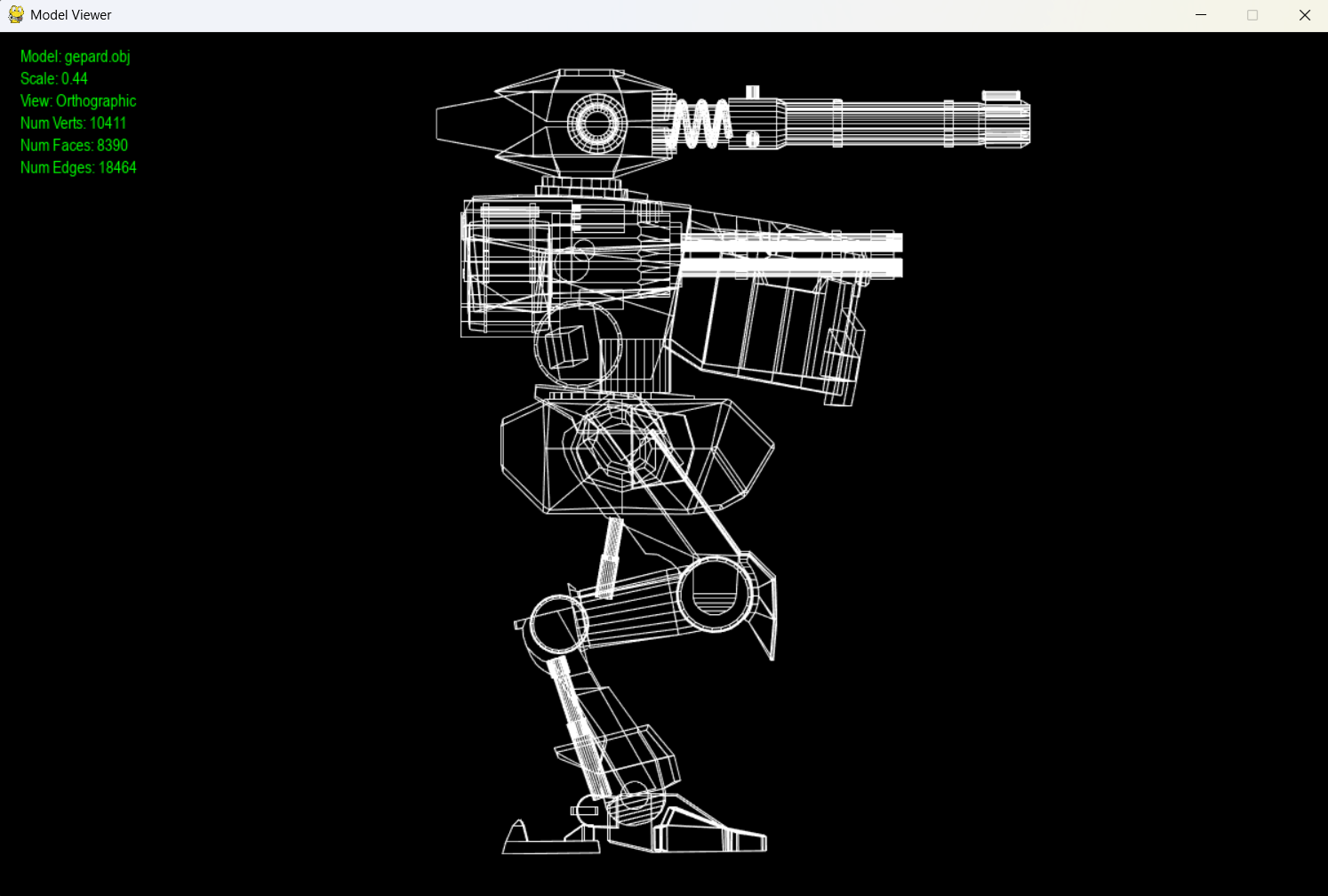
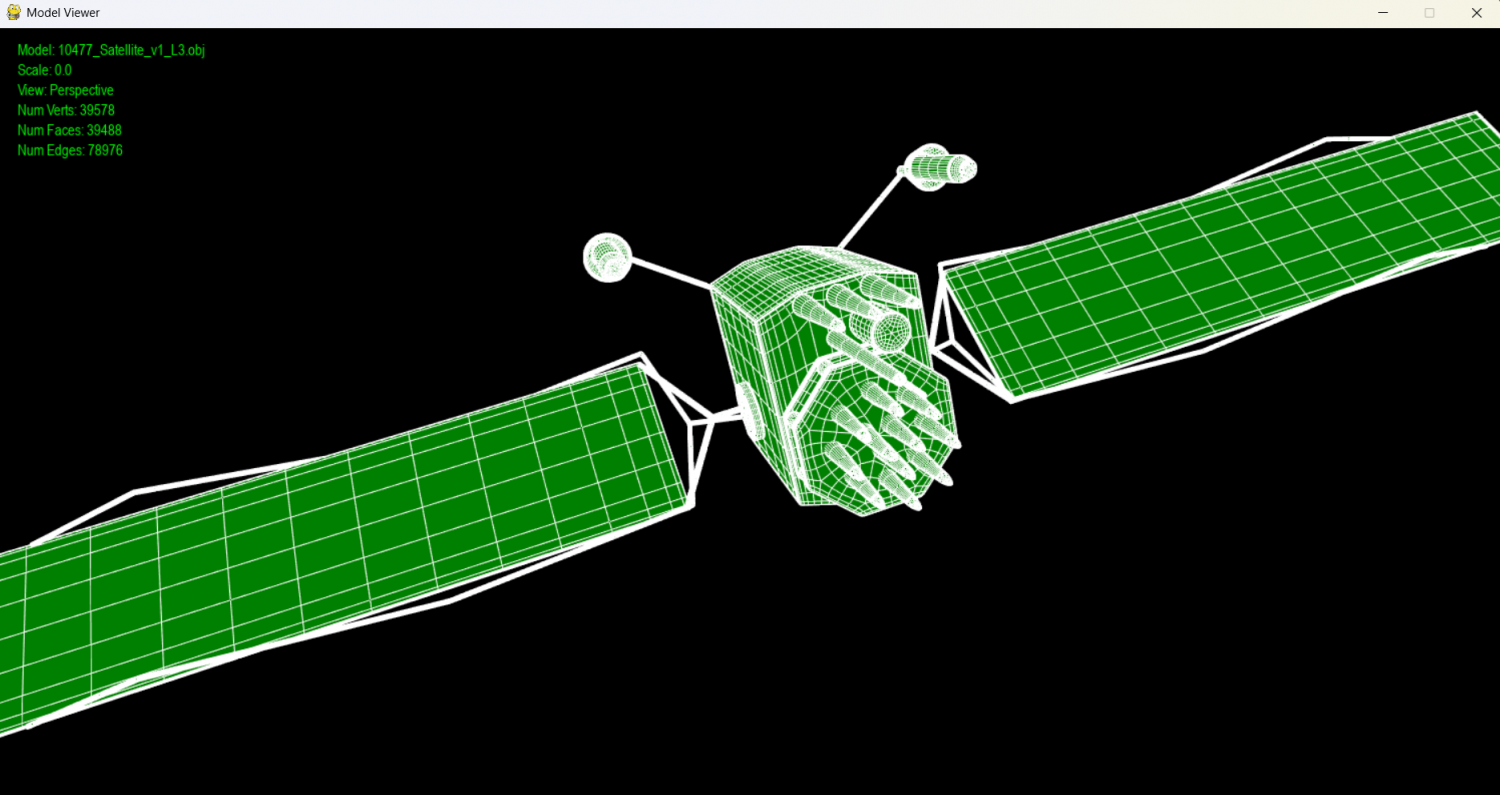
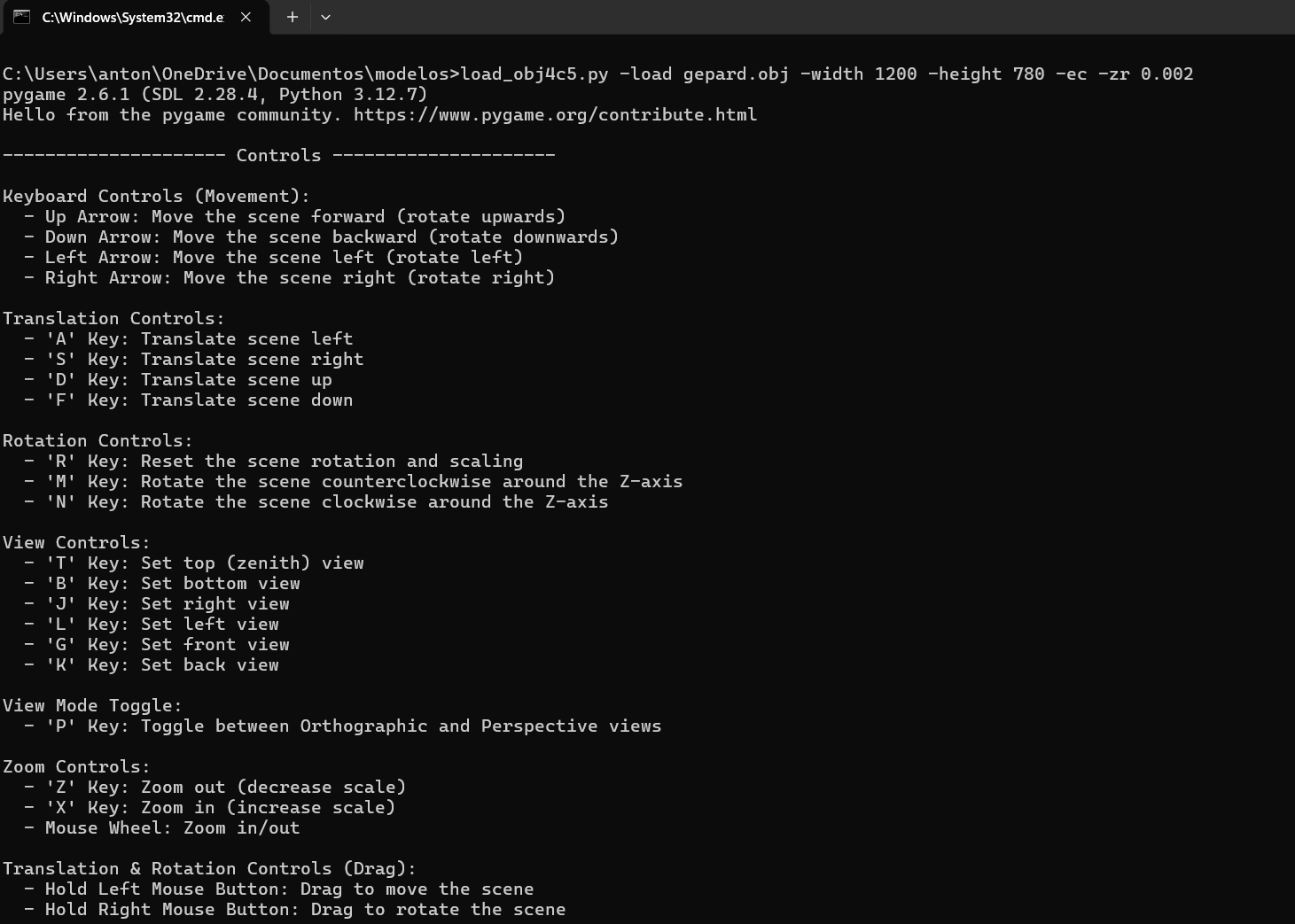
#!/usr/bin/env python
# -*- coding: utf-8 -*-
import pygame
from pygame.locals import *
from OpenGL.GL import *
from OpenGL.GLU import *
from pathlib import Path
import os
#import re
import math
import numpy as np
import argparse
from colorama import init, Fore, Style
import time
# load_obj4c5.py -load 10477_Satellite_v1_L3.obj -ec -scl 0.001 -zr 0.0001 -width 1500 -height 770 -lw 0.3
init()
rgb_colors = {'blue':[0.0,0.0,1.0,1.0], 'gray':[0.2,0.2,0.2,1.0],
'black':[0.0,0.0,0.0,1.0],
'white':[1.0,1.0,1.0,1.0]}
rgb_t = {'blue':[0,0,255], 'gray':[51,51,51],
'black':[0,0,0],
'white':[255,255,255]}
def check_width_value(width):
val = int(width)
if val < 800 or val > 1600:
raise argparse.ArgumentTypeError(Fore.RED+Style.BRIGHT+f"Width value must be less than 1601 and greater than 799."+Fore.RESET+Style.RESET_ALL)
return val
def check_height_value(height):
val = int(height)
if val < 600 or val > 900:
raise argparse.ArgumentTypeError(Fore.RED+Style.BRIGHT+f"Height value must be less than 901 and greater than 599."+Fore.RESET+Style.RESET_ALL)
return val
def check_source_ext(file):
if os.path.exists(file):
supported_formats = [".obj",".txt"]
name, ex = os.path.splitext(file)
if not ex in supported_formats:
raise argparse.ArgumentTypeError(Fore.RED+Style.BRIGHT+f"Source file must be '.obj' or 'txt' ('{ex}' is not valid)."+Fore.RESET+Style.RESET_ALL) else:
raise argparse.ArgumentTypeError(Fore.RED+Style.BRIGHT+f"FILE NOT FOUND: file or path '{file}' not found."+Fore.RESET+Style.RESET_ALL) return file
def load_obj(filename,color,args):
vertices: list[list[float]] = []
faces: list[list[int]] = []
edges: set[tuple[int, int]] = set()
num_verts: int = 0
num_triangles: int = 0
num_edges: int = 0
polygon_verts: int = 0
load_error: bool = False
line_counter: int = 0
#message_error: str
try:
with open(filename, 'r') as file:
for line in file:
line = line.strip(); line_counter += 1
if not line or line.startswith('#'): continue
parts = line.split()
# VERTICES
if parts[0] == 'v':
if len(parts) < 4:
continue
vertex = [
float(parts[1]),
float(parts[2]),
float(parts[3])
]
vertices.append(vertex)
num_verts += 1
# FACES
elif parts[0] == 'f':
face_indices: list[int] = []
for part in parts[1:]:
# soporta v, v/vt, v//vn, v/vt/vn
vals = part.split('/') if vals[0] == '':
continue
idx = int(vals[0])
# soporte índices negativos OBJ
if idx < 0:
idx = len(vertices) + idx
else:
idx -= 1
face_indices.append(idx)
if len(face_indices) < 3:
continue
polygon_verts = len(face_indices)
if color:
faces.append(face_indices)
num_triangles += 1
# generar edges
for i in range(len(face_indices)):
v1 = face_indices[i]
v2 = face_indices[(i + 1) % len(face_indices)]
edges.add(tuple(sorted((v1, v2))))
num_edges = len(edges)
# CENTERING
if args.enable_centering and vertices:
verts_np = np.array(vertices)
min_v = np.min(verts_np, axis=0)
max_v = np.max(verts_np, axis=0)
center = (min_v + max_v) / 2.0
vertices = [list(np.array(v) - center) for v in vertices]
except Exception as e:
print(f"FILE ERROR ON LINE {line_counter}: {str(e)}") load_error = True
#print(f'NV: {num_verts}') #print(f'NF: {num_triangles}')
return vertices, edges, num_verts, num_triangles, num_edges, faces, polygon_verts, load_error
_text_cache: dict = {}
def drawText(f, x, y, text, c, bgc):
if text not in _text_cache:
textSurface = f.render(text, True, c, bgc)
textData = pygame.image.tostring(textSurface, "RGBA", True)
_text_cache[text] = (textSurface.get_width(), textSurface.get_height(), textData)
w, h, data = _text_cache[text]
glWindowPos2d(x, y)
glDrawPixels(w, h, GL_RGBA, GL_UNSIGNED_BYTE, data)
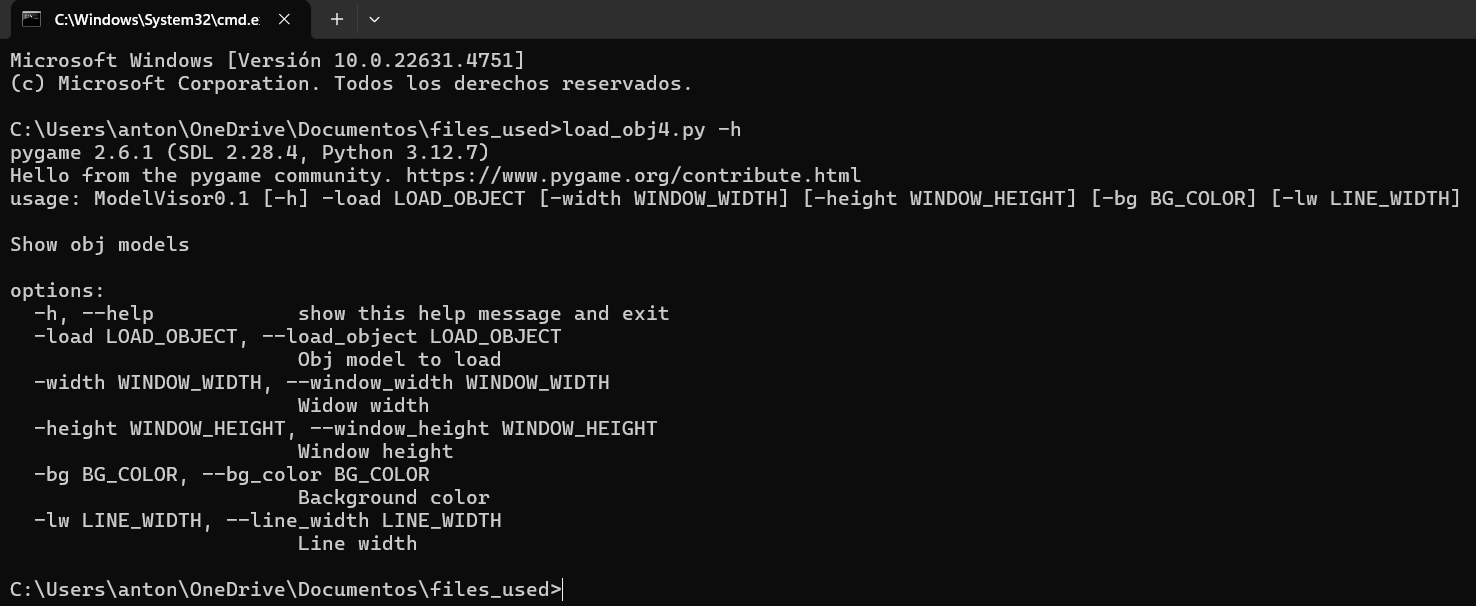
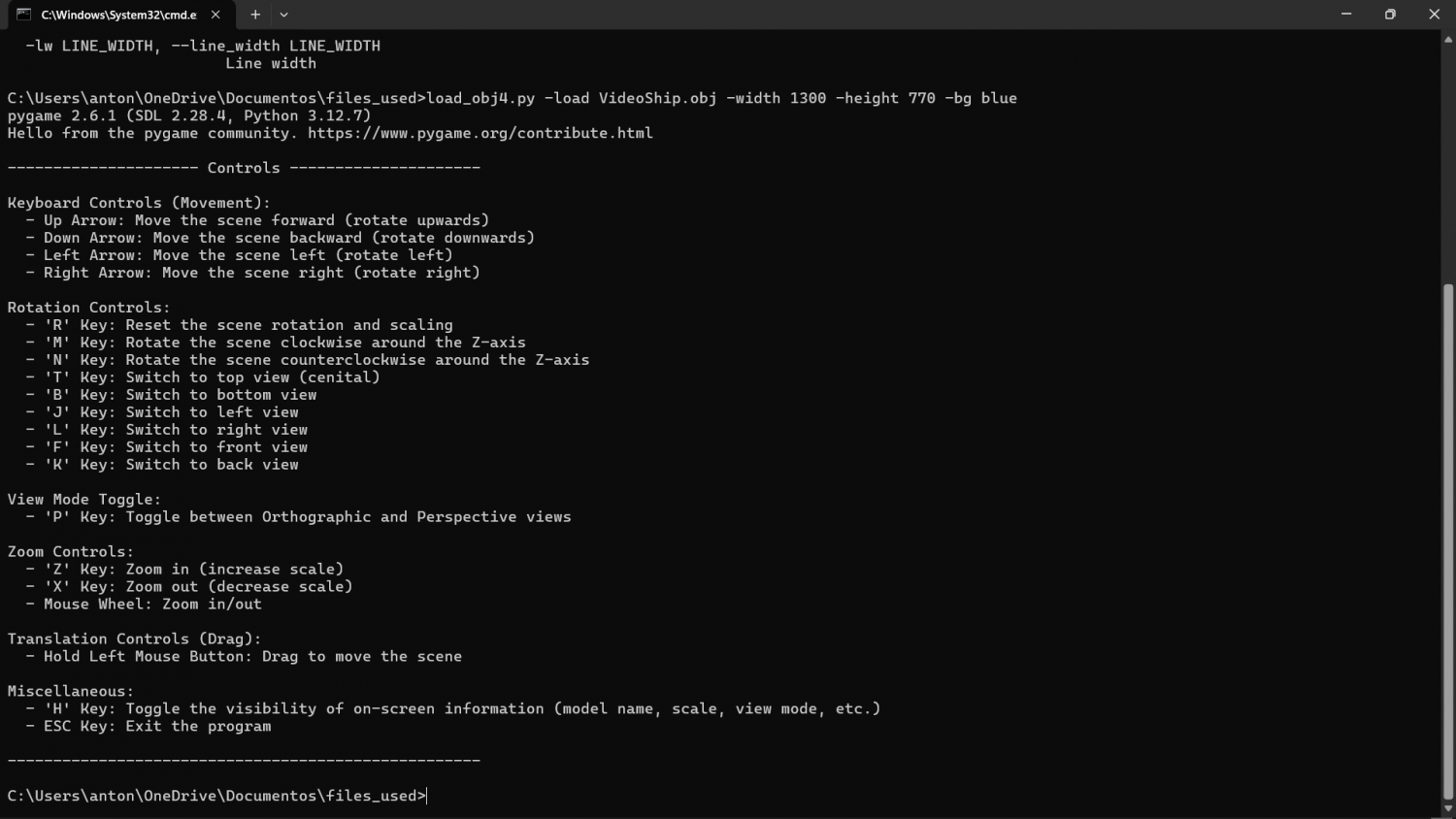
def show_controls():
print("\n--------------------- Controls ---------------------")
print("\nKeyboard Controls (Movement):") print(" - Up Arrow: Move the scene forward (rotate upwards)") print(" - Down Arrow: Move the scene backward (rotate downwards)") print(" - Left Arrow: Move the scene left (rotate left)") print(" - Right Arrow: Move the scene right (rotate right)")
print("\nTranslation Controls:") print(" - 'A' Key: Translate scene left") print(" - 'S' Key: Translate scene right") print(" - 'D' Key: Translate scene up") print(" - 'F' Key: Translate scene down")
print("\nRotation Controls:") print(" - 'R' Key: Reset the scene rotation and scaling") print(" - 'M' Key: Rotate the scene counterclockwise around the Z-axis") print(" - 'N' Key: Rotate the scene clockwise around the Z-axis")
print("\nView Controls:") print(" - 'T' Key: Set top (zenith) view") print(" - 'B' Key: Set bottom view") print(" - 'J' Key: Set right view") print(" - 'L' Key: Set left view") print(" - 'G' Key: Set front view") print(" - 'K' Key: Set back view")
print("\nView Mode Toggle:") print(" - 'P' Key: Toggle between Orthographic and Perspective views")
print("\nZoom Controls:") print(" - 'Z' Key: Zoom out (decrease scale)") print(" - 'X' Key: Zoom in (increase scale)") print(" - Mouse Wheel: Zoom in/out")
print("\nTranslation & Rotation Controls (Drag):") print(" - Hold Left Mouse Button: Drag to move the scene") print(" - Hold Right Mouse Button: Drag to rotate the scene")
print("\nMiscellaneous:") print(" - 'H' Key: Toggle the visibility of on-screen information (model name, scale, view mode)") print(" - ESC Key: Exit the program")
print("\n----------------------------------------------------")
# Clase para manejar cuaterniones
class Quaternion:
def __init__(self, w, x, y, z):
self.w = w
self.x = x
self.y = y
self.z = z
def to_matrix(self):
ww, xx, yy, zz = self.w * self.w, self.x * self.x, self.y * self.y, self.z * self.z
wx, wy, wz = self.w * self.x, self.w * self.y, self.w * self.z
xy, xz, yz = self.x * self.y, self.x * self.z, self.y * self.z
return np.array([
[1 - 2 * (yy + zz), 2 * (xy - wz), 2 * (xz + wy), 0],
[2 * (xy + wz), 1 - 2 * (xx + zz), 2 * (yz - wx), 0],
[2 * (xz - wy), 2 * (yz + wx), 1 - 2 * (xx + yy), 0],
[0, 0, 0, 1]
], dtype=np.float32)
def __mul__(self, other):
w1, x1, y1, z1 = self.w, self.x, self.y, self.z
w2, x2, y2, z2 = other.w, other.x, other.y, other.z
return Quaternion(
w1 * w2 - x1 * x2 - y1 * y2 - z1 * z2,
w1 * x2 + x1 * w2 + y1 * z2 - z1 * y2,
w1 * y2 - x1 * z2 + y1 * w2 + z1 * x2,
w1 * z2 + x1 * y2 - y1 * x2 + z1 * w2
).normalize()
def normalize(self):
mag = math.sqrt(self.w**2 + self.x**2 + self.y**2 + self.z**2)
if mag == 0:
return Quaternion(1, 0, 0, 0)
return Quaternion(self.w / mag, self.x / mag, self.y / mag, self.z / mag)
# Función para crear un cuaternión de rotación
def create_rotation_quaternion(angle, x, y, z):
half_angle = math.radians(angle) / 2.0
sin_half_angle = math.sin(half_angle)
return Quaternion(math.cos(half_angle), x * sin_half_angle, y * sin_half_angle, z * sin_half_angle)
# Función para inicializar la proyección ortogonal
def setup_view_ortho(display):
glMatrixMode(GL_PROJECTION)
glLoadIdentity()
# Definir el rango de la proyección ortogonal
aspect_ratio = display[0] / display[1]
ortho_size = 10 # Tamaño del área visible en la proyección ortogonal 10
#glOrtho(-ortho_size * aspect_ratio, ortho_size * aspect_ratio, -ortho_size, ortho_size, -50, 50)
glOrtho(-ortho_size * 0.5 * aspect_ratio, ortho_size * 0.5 * aspect_ratio, -ortho_size * 0.5, ortho_size * 0.5, -50, 50)
glMatrixMode(GL_MODELVIEW)
#glLoadIdentity()
#glTranslatef(0.0,0.0,-3.0)
def text_pos(h,p):
inc_total = (h - 600)
h_pos = p + inc_total
return h_pos
def check_color(color):
colors = ['blue','gray','black','white']
if color not in colors:
raise argparse.ArgumentTypeError(Fore.RED+Style.BRIGHT+"Background color must be 'blue', 'white', 'gray' or 'black'."+Fore.RESET+Style.RESET_ALL)
return color
def check_lw(w):
width = float(w)
if width < 0.1 or width > 10.0:
raise argparse.ArgumentTypeError(Fore.RED+Style.BRIGHT+"Line width must be in range 0.1 - 10.0."+Fore.RESET+Style.RESET_ALL)
return width
def check_positive(v):
ivalue = float(v)
if ivalue <= 0:
raise argparse.ArgumentTypeError(Fore.RED+Style.BRIGHT+f"This value must be positive ('{v}' is not valid)."+Fore.RESET+Style.RESET_ALL) return ivalue
# Función para inicializar la proyección en perspectiva
def setup_view_perspective(display):
glMatrixMode(GL_PROJECTION)
glLoadIdentity()
gluPerspective(50, (display[0] / display[1]), 0.1, 80)#50.0)
glMatrixMode(GL_MODELVIEW)
glLoadIdentity()
glTranslatef(0.0, 0.0, -10.0)
def fill_object(polygon_verts,faces,vertices):
glEnable(GL_POLYGON_OFFSET_FILL)#############
glPolygonOffset(1.0, 1.0)####################
if polygon_verts == 3:
glBegin(GL_TRIANGLES)##################
elif polygon_verts == 4:
glBegin(GL_QUADS)
elif polygon_verts > 4:
glBegin(GL_POLYGON)
glColor3f(0.0, 0.5, 0.0)
for face in faces:
for vertex in face:
glVertex3fv(vertices[vertex])
glEnd()################################
glDisable(GL_POLYGON_OFFSET_FILL)
def window(args):
# Cargar el modelo OBJ
try:
path = args.load_object
model_name = os.path.basename(path)
vertices, edges, num_verts, num_triangles, num_edges, faces, polygon_verts, load_error = load_obj(path,args.fill_object,args)
if not load_error:
show_controls()
pygame.init()
text_bgR = rgb_t[args.bg_color][0]
text_bgG = rgb_t[args.bg_color][1]
text_bgB = rgb_t[args.bg_color][2]
text_pos1 = text_pos(args.window_height,570)
text_pos2 = text_pos(args.window_height,550)
text_pos3 = text_pos(args.window_height,530)
text_pos4 = text_pos(args.window_height,510)
text_pos5 = text_pos(args.window_height,490)
text_pos6 = text_pos(args.window_height,470)
display = (args.window_width, args.window_height)
pygame.display.gl_set_attribute(pygame.GL_MULTISAMPLEBUFFERS, 1)##
pygame.display.gl_set_attribute(GL_MULTISAMPLESAMPLES, 6) ##########################
pygame.display.set_mode(display, DOUBLEBUF | OPENGL)
glEnable(GL_MULTISAMPLE)
glEnable(GL_LINE_SMOOTH)
glHint(GL_LINE_SMOOTH_HINT, GL_NICEST)
#glEnable(GL_BLEND)
#glBlendFunc(GL_SRC_ALPHA, GL_ONE_MINUS_SRC_ALPHA)
pygame.display.set_caption("Model Viewer") font = pygame.font.SysFont('arial', 15)
glEnable(GL_DEPTH_TEST)#######################################################
#glClearColor(0.0, 0.0, 1.0, 1.0)
glClearColor(rgb_colors[args.bg_color][0],
rgb_colors[args.bg_color][1],
rgb_colors[args.bg_color][2],
rgb_colors[args.bg_color][3])
##
scale = args.scale
hide_data = False
green_val = 255
rotating = False
# Crear la lista de display para el modelo
model_list = glGenLists(1)
glNewList(model_list, GL_COMPILE)
glLineWidth(args.line_width)
if args.fill_object:
fill_object(polygon_verts,faces,vertices)
if args.bg_color == 'white':
glColor3f(0.0, 0.0, 0.0) # Color negro
green_val = 100
else:
glColor3f(1.0, 1.0, 1.0) # Color blanco
# Convertir el conjunto a una lista ordenada
ordered_edges = sorted(list(edges))
glBegin(GL_LINES)
for edge in ordered_edges:
for vertex in edge:
glVertex3fv(vertices[vertex])
glEnd()
glEndList()
# Inicializar la vista en perspectiva por defecto
is_ortho = False
setup_view_perspective(display)
# Inicializar el cuaternión de rotación (sin rotación inicial)
quaternion = Quaternion(1, 0, 0, 0)
dragging = False
last_mouse_pos = (0, 0)
translation = [0.0, 0.0]
clock = pygame.time.Clock()
last_time = time.perf_counter() ###
running = True
while running:
now = time.perf_counter()
#dt = clock.tick(60) / 1000.0 # Delta time en segundos, límite 60 FPS
dt = min(now - last_time, 0.05)
last_time = now
rot_speed = args.rotation_speed * dt # Grados por segundo (ajustable)
trans_speed = args.translation_speed * dt # Unidades por segundo (ajustable)
for event in pygame.event.get():
if event.type == pygame.QUIT:
running = False
elif event.type == pygame.KEYDOWN:
'''if event.key == pygame.K_z:
scale += 0.05
elif event.key == pygame.K_x:
scale -= 0.05'''
if event.key == pygame.K_ESCAPE:
running = False
elif event.key == pygame.K_h:
hide_data = not hide_data
elif event.key == pygame.K_r:
quaternion = Quaternion(1, 0, 0, 0)
scale = args.scale
dragging = False
last_mouse_pos = (0, 0)
translation = [0.0, 0.0]
is_ortho = False
setup_view_perspective(display) # Restablece vista en perspectiva
args.solid = False
elif event.key == pygame.K_p: # Cambiar entre ortogonal y perspectiva
is_ortho = not is_ortho
if is_ortho:
setup_view_ortho(display)
else:
setup_view_perspective(display)
elif event.key == pygame.K_t: # Vista cenital (tecla 't')
# Aplicar rotación para la vista cenital
quaternion = Quaternion(1, 0, 0, 0) # Restablece rotación
#translation = [0.0, 0.0] # Restablece la traslación
#scale = 1 # Restablece el zoom
# Rotar la cámara 90 grados sobre el eje X para vista cenital
rotation = create_rotation_quaternion(-90, 1, 0, 0)
quaternion = quaternion * rotation
elif event.key == pygame.K_b:
quaternion = Quaternion(1, 0, 0, 0) # Restablece rotación
rotation = create_rotation_quaternion(90, 1, 0, 0)
quaternion = quaternion * rotation
elif event.key == pygame.K_j:
quaternion = Quaternion(1, 0, 0, 0) # Restablece rotación
rotation = create_rotation_quaternion(90, 0, 1, 0)
quaternion = quaternion * rotation
elif event.key == pygame.K_l:
quaternion = Quaternion(1, 0, 0, 0) # Restablece rotación
rotation = create_rotation_quaternion(-90, 0, 1, 0)
quaternion = quaternion * rotation
elif event.key == pygame.K_g:
quaternion = Quaternion(1, 0, 0, 0) # Restablece rotación
rotation = create_rotation_quaternion(0, 0, 1, 0)
quaternion = quaternion * rotation
elif event.key == pygame.K_k:
quaternion = Quaternion(1, 0, 0, 0) # Restablece rotación
rotation = create_rotation_quaternion(180, 0, 1, 0)
quaternion = quaternion * rotation
elif event.type == pygame.MOUSEWHEEL: # Rueda ratón
zoom_factor = 1.08 if event.y > 0 else (1/1.08 if event.y < 0 else 1.0)
scale *= zoom_factor
elif event.type == pygame.MOUSEBUTTONDOWN:
if event.button == 1:
dragging = True
last_mouse_pos = pygame.mouse.get_pos()
elif event.button == 3: # botón derecho para rotación
rotating = True
last_mouse_pos = pygame.mouse.get_pos()
elif event.type == pygame.MOUSEBUTTONUP:
if event.button == 1:
dragging = False
elif event.button == 3:
rotating = False
elif event.type == pygame.MOUSEMOTION:
mouse_x, mouse_y = pygame.mouse.get_pos()
dx = mouse_x - last_mouse_pos[0]
dy = mouse_y - last_mouse_pos[1]
if dragging:
translation[0] += dx * 0.01
translation[1] -= dy * 0.01
if rotating:
# Sensibilidad proporcional al tiempo entre frames
mouse_rot_speed = 120.0 * dt
angle_x = dy * -mouse_rot_speed * 0.1
angle_y = dx * -mouse_rot_speed * 0.1
# Rotación alrededor del eje X e Y (en coordenadas del mundo)
qx = create_rotation_quaternion(angle_x, 1, 0, 0)
qy = create_rotation_quaternion(angle_y, 0, 1, 0)
quaternion = quaternion * qx * qy
last_mouse_pos = (mouse_x, mouse_y)
key = pygame.key.get_pressed()
# Rotación con cuaterniones (si se presionan las teclas de dirección)
if key[pygame.K_UP]:
rotation = create_rotation_quaternion(rot_speed, 1, 0, 0)
quaternion = quaternion * rotation
if key[pygame.K_DOWN]:
rotation = create_rotation_quaternion(-rot_speed, 1, 0, 0)
quaternion = quaternion * rotation
if key[pygame.K_RIGHT]:
rotation = create_rotation_quaternion(-rot_speed, 0, 1, 0)
quaternion = quaternion * rotation
if key[pygame.K_LEFT]:
rotation = create_rotation_quaternion(rot_speed, 0, 1, 0)
quaternion = quaternion * rotation
if key[pygame.K_m]:
rotation = create_rotation_quaternion(rot_speed, 0, 0, 1)
quaternion = quaternion * rotation
if key[pygame.K_n]:
rotation = create_rotation_quaternion(-rot_speed, 0, 0, 1)
quaternion = quaternion * rotation
if key[pygame.K_z]:
scale -= args.zoom_rate * (dt / (1/60))
if key[pygame.K_x]:
scale += args.zoom_rate * (dt / (1/60))
# TRANSLATIONS
if key[pygame.K_a]:
translation[0] -= trans_speed
if key[pygame.K_s]:
translation[0] += trans_speed
if key[pygame.K_d]:
translation[1] += trans_speed
if key[pygame.K_f]:
translation[1] -= trans_speed
# Limpiar la pantalla y cargar la nueva matriz de rotación
glClear(GL_COLOR_BUFFER_BIT | GL_DEPTH_BUFFER_BIT)
glPushMatrix()
glTranslatef(translation[0], translation[1], 0)
# Convertir el cuaternión a matriz de rotación
rotation_matrix = quaternion.to_matrix()
glMultMatrixf(rotation_matrix)
# Dibujar el modelo
glScalef(scale, scale, scale)
glCallList(model_list)
glPopMatrix()
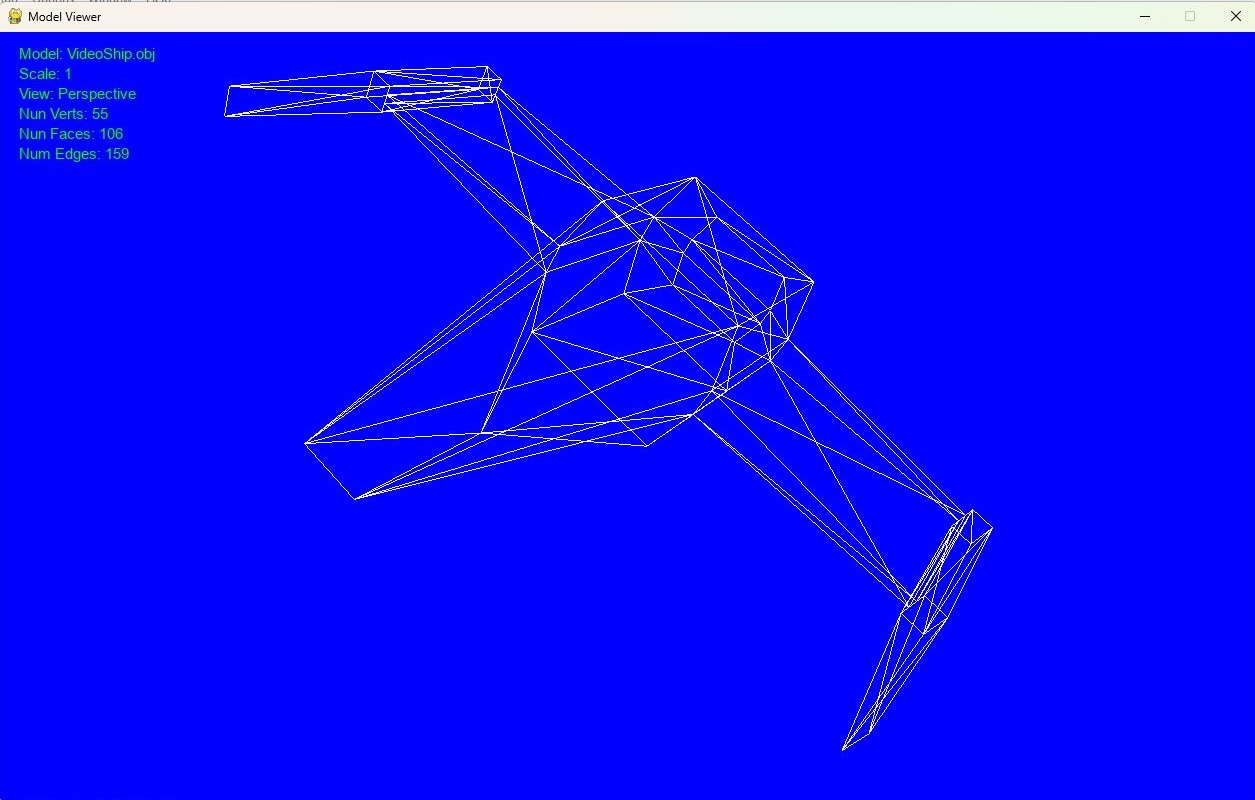
if not hide_data:
drawText(font, 20, text_pos1, f'Model: {model_name}', (0, green_val, 0, 255), (text_bgR, text_bgG, text_bgB)) drawText(font, 20, text_pos2, f'Scale: {round(scale, 2)}', (0, green_val, 0, 255), (text_bgR, text_bgG, text_bgB)) view_mode = "Orthographic" if is_ortho else "Perspective"
drawText(font, 20, text_pos3, f'View: {view_mode}', (0, green_val, 0, 255),(text_bgR, text_bgG, text_bgB)) drawText(font, 20, text_pos4, f'Num Verts: {num_verts}',(0, green_val, 0, 255),(text_bgR, text_bgG, text_bgB)) drawText(font, 20, text_pos5, f'Num Faces: {num_triangles}',(0, green_val, 0, 255),(text_bgR, text_bgG, text_bgB)) drawText(font, 20, text_pos6, f'Num Edges: {num_edges}',(0, green_val, 0, 255),(text_bgR, text_bgG, text_bgB))
pygame.display.flip()
clock.tick(120)###########
glDeleteLists(model_list, 1)
pygame.quit()
else:
print(Fore.RED+Style.BRIGHT + "FILE ERROR" + Fore.RESET+Style.RESET_ALL)
print("terminated")
except Exception as e:
print(Fore.RED+Style.BRIGHT + "UNEXPECTED ERROR: " + e.__str__() + Fore.RESET+Style.RESET_ALL)
def main():
parser = argparse.ArgumentParser(prog="ModelVisor1.0", conflict_handler='resolve',
description="Show obj models",allow_abbrev=False)
parser.add_argument('-load','--load_object',required=True,type=check_source_ext,help="Obj model to load") parser.add_argument('-width','--window_width',type=check_width_value,default=800,help="Window width (default is 800)") parser.add_argument('-height','--window_height',type=check_height_value,default=600,help="Window height (default is 600)") parser.add_argument('-bg','--bg_color',type=check_color,default='black',help="Background color (default is 'black')") parser.add_argument('-lw','--line_width',type=check_lw,default=1.0,help="Line width (default is 1.0)") parser.add_argument('-fill','--fill_object',action='store_true',help="Add solid color to model") parser.add_argument('-scl','--scale',type=check_positive,default=1.0,help="Object scale (default is 1.0)") parser.add_argument('-zr','--zoom_rate',type=check_positive,default=0.05,help="Zoom Rate (default is 0.05)") parser.add_argument('-ec','--enable_centering',action='store_true',help="Enable automatic centering") parser.add_argument('-rspd','--rotation_speed',type=check_positive,default=90.0,help="Rotation speed (default is 90.0)") parser.add_argument('-tspd','--translation_speed',type=check_positive,default=2.0,help="Translation speed (default is 2.0)")
args = parser.parse_args()
window(args)
if __name__ =="__main__":
main()