
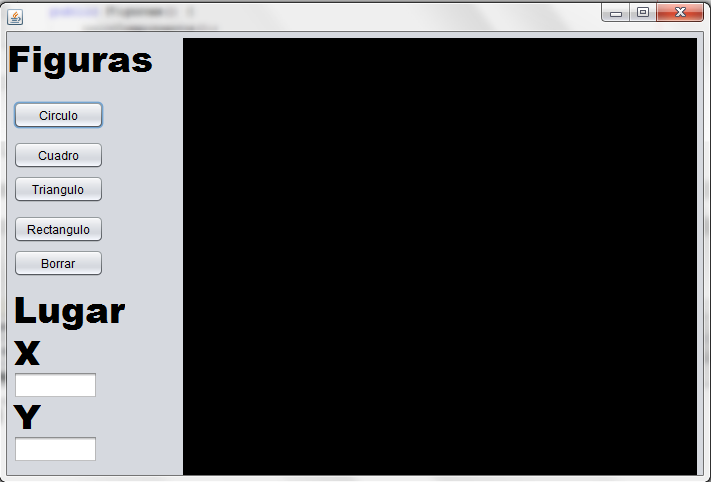
Dar posicion a una figura con la funcion Graphics mediante un JTextField
Publicado por Emmanuel (1 intervención) el 12/03/2017 19:25:45
Tengo mi clase interface
****************************************************************************************
*****************************************************************************************
La clase Cuadrado
****************************************************************************************
********************************************************************************************************************
Y la clase Figuras (el main)
******************************************************************************************************************
No tengo errores en el codigo pero al momento de presionar el boton para pintar el Cuadrado no lo pinta y en cambio me tira un monton de errores
****************************************************************************************
1
2
3
4
5
6
7
8
9
10
11
12
13
14
15
16
17
18
19
/*
* To change this license header, choose License Headers in Project Properties.
* To change this template file, choose Tools | Templates
* and open the template in the editor.
*/package lab2figuras;
import java.awt.Graphics;
/**
*
* @author Emmanuel
*/public interface Lab2Figuras { /**
* @param args the command line arguments
*/public void Dibujar(Graphics g);
}*****************************************************************************************
La clase Cuadrado
****************************************************************************************
1
2
3
4
5
6
7
8
9
10
11
12
13
14
15
16
17
18
19
20
21
22
23
24
25
26
27
28
29
30
31
32
33
34
35
36
37
38
39
40
41
42
43
44
45
46
47
48
49
50
51
52
53
54
55
56
57
58
59
60
61
62
/*
* To change this license header, choose License Headers in Project Properties.
* To change this template file, choose Tools | Templates
* and open the template in the editor.
*/package lab2figuras;
import java.awt.Graphics;
import java.util.Random;
import java.awt.Color;
import java.*;
import javax.swing.JTextField;
/**
*
* @author Emmanuel
*/public class Cuadrado implements Lab2Figuras {public JTextField TamX;
public JTextField TamY;
public Cuadrado(){}
public void Dibujar(Graphics g){
Random numAzar = new Random();
int c, a, b, t;
Color miColor;
int Rojo = 255; int Verde = 0; int Azul = 0;String CoorX = TamX.getText();//TamX: nombre de la variable de mi JTextField para introducir la //coordenada en X
String CoorY = TamY.getText();//TamY: nombre de la variable de mi JTextField para introducir la //coordenada en Y
int A, B; // Declaro mis enteros para convertir los Strings
A = Integer.parseInt(CoorX);
B = Integer.parseInt(CoorY);
for(c=1; c<=15; c=c+1) {
a = (int)(numAzar.nextDouble()*800);
b = (int)(numAzar.nextDouble()*600);
t = (int)(numAzar.nextDouble()*70+20);
Rojo = (int)(numAzar.nextDouble()*255);
Verde = (int)(numAzar.nextDouble()*255);
Azul = (int)(numAzar.nextDouble()*255);
miColor = new Color(Rojo, Verde, Azul);
g.setColor(miColor);
g.fillRect(A, B, 60, 60);
********No tengo errores pero aqui es donde quiero pasar mi JTextfield como parametro entero****************
} }}********************************************************************************************************************
Y la clase Figuras (el main)
******************************************************************************************************************
1
2
3
4
5
6
7
8
9
10
11
12
13
14
15
16
17
18
19
20
21
22
23
24
25
26
27
28
29
30
31
32
33
34
35
36
37
38
39
40
41
42
43
44
45
46
47
48
49
50
51
52
53
54
55
56
57
58
59
60
61
62
63
64
65
66
67
68
69
70
71
72
73
74
75
76
77
/*
* To change this license header, choose License Headers in Project Properties.
* To change this template file, choose Tools | Templates
* and open the template in the editor.
*/import java.awt.Graphics;
import java.util.Random;
import java.awt.Color;
import lab2figuras.Cuadrado;import java.awt.EventQueue;
import lab2figuras.Circulo;import lab2figuras.Lab2Figuras;/**
*
* @author Emmanuel
*/public class Figuras extends javax.swing.JFrame {
/**
* Creates new form Figuras
*/public Figuras() {
initComponents();
} /**
* This method is called from within the constructor to initialize the form.
* WARNING: Do NOT modify this code. The content of this method is always
* regenerated by the Form Editor.
*/@SuppressWarnings("unchecked")
private void initComponents() {
);pack();
}private void btnCuadroActionPerformed(java.awt.event.ActionEvent evt) {
// TODO add your handling code here:
Graphics k = Hoja_dibujo.getGraphics();
Lab2Figuras Cua = new Cuadrado();
Cua.Dibujar(k);
} /**
* @param args the command line arguments
*/public static void main(String args[]) {
/* Set the Nimbus look and feel */ /* Create and display the form */java.awt.EventQueue.invokeLater(new Runnable() {
public void run() {
new Figuras().setVisible(true);
}});
} // Variables declaration - do not modify
private javax.swing.JPanel Hoja_dibujo;
public javax.swing.JTextField TamX;
public javax.swing.JTextField TamY;
private javax.swing.JButton btnBorrar;
private javax.swing.JButton btnCirculo;
private javax.swing.JButton btnCuadro;
private javax.swing.JButton btnRectangulo;
private javax.swing.JButton btnTriangulo;
private javax.swing.JLabel jLabel1;
private javax.swing.JLabel jLabel2;
private javax.swing.JLabel jLabel3;
private javax.swing.JLabel jLabel4;
// End of variables declaration
}No tengo errores en el codigo pero al momento de presionar el boton para pintar el Cuadrado no lo pinta y en cambio me tira un monton de errores
Valora esta pregunta

0