
Interruptor con CSS
CSS
Publicado el 2 de Septiembre del 2019 por Joan (121 códigos)
2.486 visualizaciones desde el 2 de Septiembre del 2019
Creando nuestro interruptor con CSS.
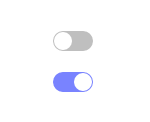
Crear cuenta<!DOCTYPE html>
<html>
<head>
<meta charset="utf-8">
<style>
.switch {
position: relative;display: inline-block;
width: 40px; height: 20px;background-color: rgba(0, 0, 0, 0.25);
border-radius: 20px;
transition: all 0.3s;
}.switch::after {
content: '';
position: absolute; width: 18px; height: 18px;border-radius: 18px;
background-color: white;
top: 1px; left: 1px;transition: all 0.3s;
}input[type='checkbox']:checked + .switch::after {
transform: translateX(20px);
}input[type='checkbox']:checked + .switch {
background-color: #7983ff;
}.offscreen {
position: absolute;left: -9999px;
}</style>
</head>
<body>
<p><input type="checkbox" id="toggle1" class="offscreen"><label for="toggle1" class="switch"></label></p>
<p><input type="checkbox" id="toggle2" class="offscreen"><label for="toggle2" class="switch"></label></p>
</body>
</html>
Comentarios sobre la versión: 1 (0)
No hay comentarios