
Gestor de Productos
Python
Publicado el 23 de Diciembre del 2020 por Alexander (15 códigos)
3.728 visualizaciones desde el 23 de Diciembre del 2020
Aplicación para gestionar productos sencilla:)
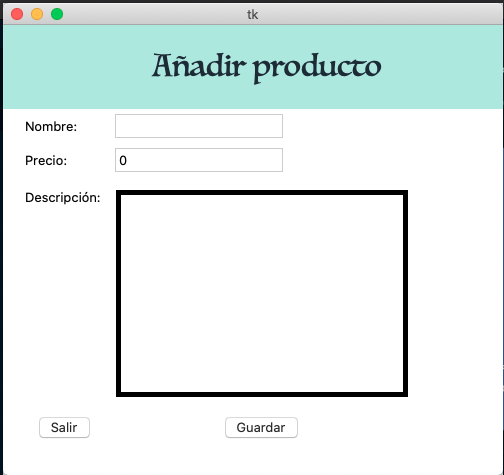
Crear cuentafrom tkinter import *from tkinter import messagebox as MessageBox
from tkinter import ttk
app = Tk()
app.geometry("510x500")
#pantallasdef home():
app.geometry("620x500")
home_label.config(
fg = "#17202A",
bg = "#A3E4D7",
font = ("luminari", 30),
padx = 20, pady = 20,
width = 32 )home_label.grid(row = 0, column = 0, padx = 3, pady = 3)
productsBox.grid(row = 1)
product_table.grid(row = 1, column = 0, columnspan = 3,padx = 5, pady = 5)
product_table.heading("#0", text = "Producto", anchor = W)
product_table.heading("#1", text="Precio", anchor=W)
product_table.heading("#2", text="Descripcion", anchor=W)
#listar productos for x in products:if len(x) == 3:
x.append("Add")
product_table.insert("", 0, text = x[0], values = x[0])
#deleteframe.grid_remove()
add_label.grid_remove()
info_label.grid_remove()
return True
def add():
app.geometry("500x450")
add_label.config(
fg="#17202A",
bg="#A3E4D7",
font=("luminari", 30),
padx=20, pady=20,
width=27 )frame.grid(row=1)
add_label.grid(row = 0, column = 0, columnspan = 4)
#deleteproductsBox.grid_remove()
home_label.grid_remove()
info_label.grid_remove()
#addadd_name_label.grid(row = 3, column = 0, padx = 3, pady = 3, sticky = W)
add_name_entry.grid(row = 3, column = 1, padx = 3, pady = 3, sticky = W)
add_price_label.grid(row=4, column=0, padx=3, pady=3, sticky = W)
add_price_entry.grid(row=4, column=1, padx=3, pady=3, sticky = W)
add_description_label.grid(row=5, column=0, padx=3, pady=9, sticky = NW)
add_description_entry.grid(row=5, column = 1, padx=3, pady=10, sticky = W)
add_description_entry.config(width = 40, height = 15, bd = 5, relief = SOLID)
save_button.grid(row = 6, column = 1, padx = 3, pady = 3)
bye.grid(row = 6, column = 0)
return True
def info():
info_label.config(
fg="#17202A",
bg="#A3E4D7",
font=("luminari", 30),
padx=20, pady=20,
width=27 )info_label.grid(row = 0, column = 0)
Label(app, text = "Hecho por Alexander Sanchez")
#deleteproductsBox.grid_remove()
frame.grid_remove()
home_label.grid_remove()
add_label.grid_remove()
return True
def add_products():
# DELETESproductsBox.grid_remove()
products.append([name_data.get(),
price_data.get(),
add_description_entry.get("1.0", "end-1c")])
name_data.set("")
price_data.set("")
add_description_entry.delete("1.0", END)
MessageBox.showinfo("Datos guardados:)")
home()
#Variablesproducts = []
name_data = StringVar()
price_data = IntVar()
#description_data = StringVar#DEclaracion de pantallashome_label = Label(app, text = "Inicio")
productsBox = Frame(app, width = 250)
#TREEVIEWproduct_table = ttk.Treeview(productsBox,height=21, columns=('#0', '#1'))
add_label = Label(app, text="Añadir producto")
info_label = Label(app, text="informacion")
#frameframe = Frame(app)
#campos formularios:add_name_label = Label(frame, text = "Nombre: ")
add_name_entry = Entry(frame, textvariable = name_data)
add_price_label = Label(frame, text = "Precio: ")
add_price_entry = Entry(frame, textvariable = price_data)
add_description_label = Label(frame, text = "Descripción: ")
add_description_entry = Text(frame)
save_button = Button(frame, text = "Guardar", command = add_products)
bye = Button(frame, text = "Salir", command = quit)
#menuMi_Menu = Menu(app)
app.config(menu = Mi_Menu)
submenu = Menu(Mi_Menu, tearoff = 0)
Mi_Menu.add_cascade(label = "Archivo", menu = submenu)
submenu.add_cascade(label= "Inicio", command = home)
submenu.add_command(label= "Añadir", command = add)
submenu.add_command(label="información", command = info)
submenu.add_separator()
submenu.add_command(label="Salir", command = quit)
if __name__ == '__main__':
home()
app.mainloop()
Comentarios sobre la versión: 1.0 (0)
No hay comentarios